


Overview
All Permit applications have a field in which the Construction Type can be specified. This is the page in which you define the various Construction Types. The construction types created here will appear in a drop-down list attached to the Construction Type field in the New Building Permit Type wizard, building permit types and individual building permits.
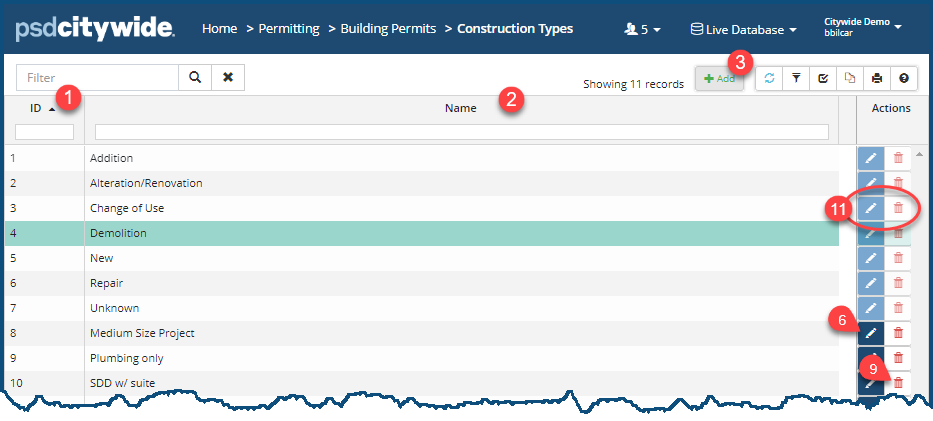
The Construction Types screen is very simple. Each construction type involves two fields: the construction type ID ❶ (which is automatically assigned by the system) and the (user-provided) Name ❷ of the construction type.
Add a Construction Type
- Click on +Add ❸. The New Construction Type dialog box appears:
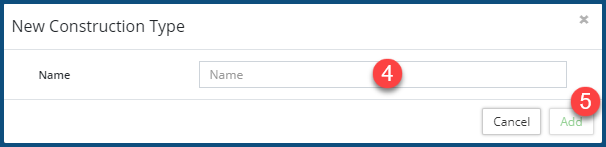
- Provide a Name ❹ for the new construction type.
- Click Add ❺.
Edit a Construction Type
- Click on the Edit icon ❻. The Edit Construction Type dialog box appears:
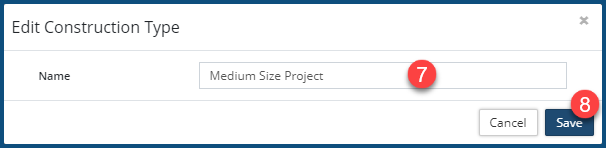
- Rename ❼ the Construction Type.
- Click Save ❽.
Delete a Construction Type
- Click on the Delete icon ❾. The following dialog box appears:
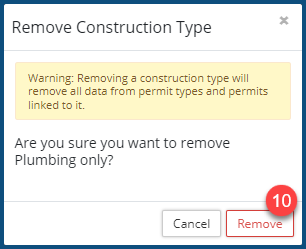
- Click on Remove ❿ to delete the construction type.
Non-editable and non-removable Construction Types
Some construction types cannot be edited or removed. The edit and delete icons for each of them are shaded lightly ⓫, and scrolling over them produces a "NO" sign 🚫. These construction types are hard-coded, universal construction types embedded in the system.


