


Overview
Citywide calculates the amortization of an asset using the in-service date, historical cost, and estimated useful life of the asset. Amortization is calculated on a monthly basis and starts in the month of the year entered into the In-Service-Date field (if following a half-year rule for amortization, enter YYYY-07-DD). The Amortization page displays the schedule showing opening/closing net book values (NBV), accumulated amortization expense, etc. Users can customize the view by adding additional columns as needed, as well as export to Excel or to PDF.
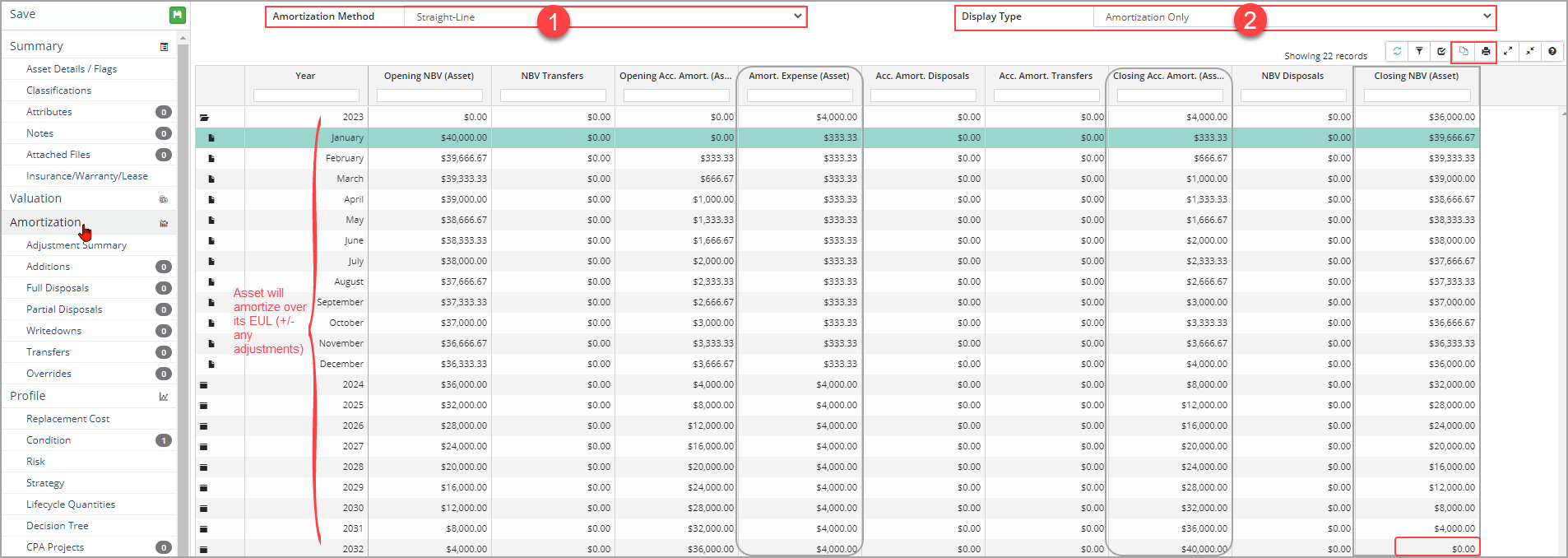
In the screenshot above the asset is amortizing using a Straight-Line method for 10 years starting in January of 2023. The display defaults to Amortization Only with additional views available on the dropdown menu. Adjustments completed on the asset (i.e., additions, disposals, writedowns, etc.) are taken into consideration and recorded on the schedule using the adjustment date.
- Click the Display Type field and select an option from the dropdown.
- Cost and Amortization: Displays columns related to the amortization of the asset as well as cost adjustments.
- Cost Only: Shows the opening/closing cost columns and any adjustments completed on the asset.
- Amortization Only: Displays columns related to the amortization of the asset and is the default view.
- Graph: Stacked bar chart showing Closing Acct Amortization (ACC) and Closing NBV .
- ARO specific views: Four additional views are listed only when an ARO is entered on the asset.
To change the amortization method:
Changing the amortization method of an asset will affect prior year reports.
- Click the Amortization Method field and select an option from the dropdown.
- Non-Amortized: The asset will not amortize.
- Straight-Line: Assumes an asset's value deteriorates at a constant rate over its EUL. It is the most common method and will spread the amortization expense evenly across the EUL of the asset using the in-service-date as the starting point.
- Declining Balance: The amortization expense is higher in the beginning of the amortization schedule and lower in later years. This method will calculate the annual amortization expense based on the previous year's closing net book value. When this method is selected an Amortization Percent is required.

- Unit of Output: The asset is amortized based on the asset's practical usage (i.e., hours of service, or specific volume of units) rather than the EUL. When this method is selected additional fields such as Unit of Output Capacity, Unit of Output Annual Usage, etc. are required to calculate the amortization rate across the asset's EUL.

- Once an amortization method is selected, click Save.
If the database has a Year-End Lock and the in-service- date of the asset comes before the year-end lock date then the amortization method cannot be changed.


