


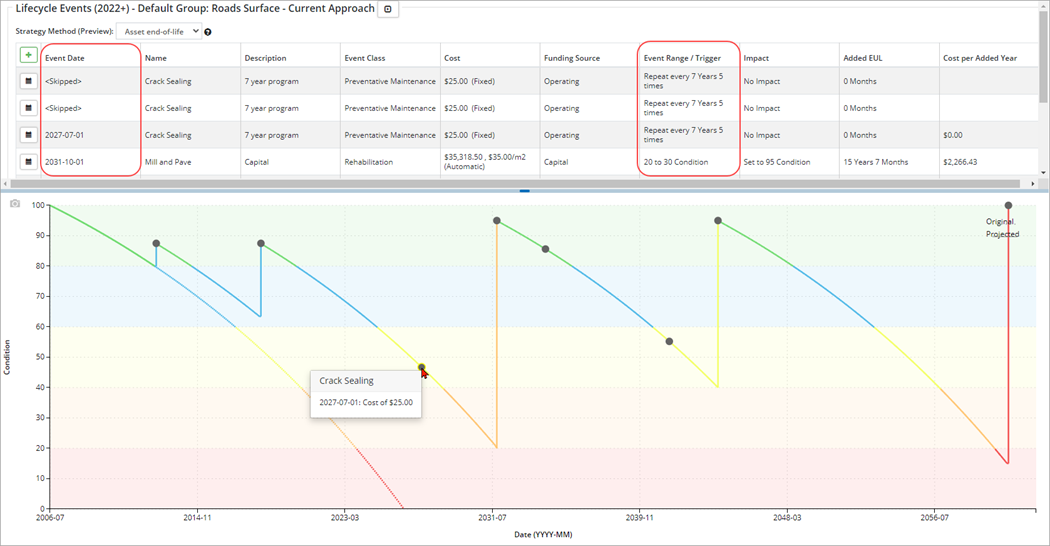
A Lifecycle strategy applied at the asset level is relative to the current reporting year, and is also affected by condition assessments. If an event’s trigger point has passed, the event will be skipped. In the screenshot below, the first two events within the crack sealant program are skipped because it is triggered based on the year (scheduled every 7 years, up to 5 times), but the asset’s in-service date is in 2006, and the reporting year is set to 2022, so those first two events would have happened prior to 2022 (2013 and 2020). Since the event is set to appear every 7 years, the next scheduled event is set for 2027.
Step 1

Step 2
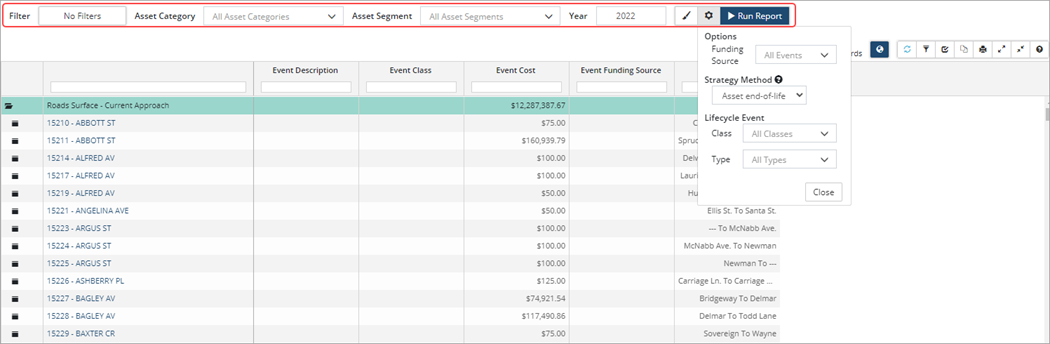
Reports can be filtered by:
- Funding Source – Capital, Operating, or Growth
- Lifecycle Event Class – Maintenance, Rehabilitation, Replacement, etc.
- Lifecycle Event Type – lists all events by profile
Click  to see the strategy method used which by default is Asset end-of-life, meaning the asset’s first replacement is based on its original EUL, modified by adjustments and condition assessments. Mouse over the blue bubble for a full description.
Once an event is scheduled and/or completed the event will cease to show in this report.


