


Property Uses

Jul 11, 2025
Overview
Property Uses enumerates a variety of different property uses that can be referenced in Properties and the Building Permits module in Citywide. Property uses list can be accessed from the building permit type or directly from the permit application to populate Current Use and Intended Use fields. Property Uses can be imported and set up by our Implementation team during system setup, or you can also import them through the Upload Center. Additional uses can be added at any time afterwards, either from the Upload Center or on the Property Uses page.
Add a Property Use
Navigate to Home > Properties > Property Uses
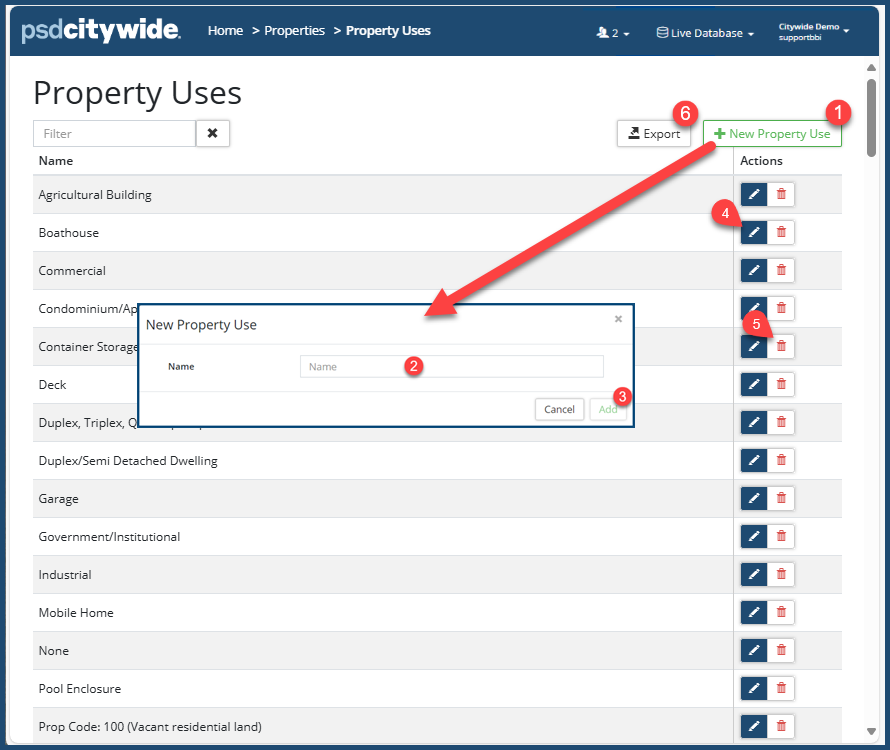
- Click on + New Property Use ❶. The New Property Use dialog box appears:
- End a Name ❷.
- Click Add ❸.
Edit a Property Use
- Click on the Edit tool
 ❹. The Edit Property Use dialog box appears:
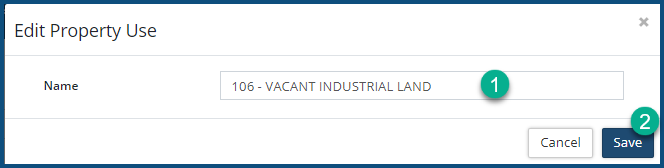
- Make the required changes to the Name ❶.
- Click on Save ❷.
Delete a Property Use
- Click on the Delete tool
 ❺.When prompted, click on Remove .
Export the Property Uses List
You can export the Property Use list. To do so:
- Click on Export ❻.
- Select a location for the Property Uses.csv file.


