The Model Administration module is used to construct the core data model and model components shared by all CWBC modules.
Other CWBC modules (Operating Plan, Salary Plan, Capital Plan) may contain additional administrative functions beyond the core model components defined in Model Administration.
Configuration
Budgeting and planning processes are highly variable across organizations. The Model Administration module has been designed with maximum flexibility, to accommodate of a wide variety of data structures, reporting models and business processes.
The Chart of Accounts (COA) in CWBC will be configured to fit the organization's specific budgeting and reporting requirements.
Model Administration Components
The Model Administration module consists of the following components:
| COA Chart of Accounts |
Defines the data structure for data stored for both the Operating and Capital plan modules. The COA is typically composed of a combination of Key Segments with the length and order defined through Key Segment mapping - See Classes for more information on Key Segment Mapping. |
| Attributes |
Attributes may be one of two types:
Key Segments: are the foundational components of the CWBC data model. These perform a similar role to account segments found in accounting systems. For example, in a typical expense and revenue budgeting application for a public sector organization one might expect to see Key Segments such as Fund, Department and Object. There is no limit to the number of Key Segments that can be created within the application. Each Key Segments contains a list of items (for example an Object Key Segment contains all the Object items) which can either be maintained manually or imported.
Other Attributes: are other model components that can be related to one or more Key Segments to assist with reporting.
For example, a Key Segment called "Capital Project" may be created, which contains a list of capital projects being used in the Capital Plan module. An organization might want to keep a record of who the project manager is, the project status (e.g. approved / not approved) and the project type (e.g. building, equipment, etc.). In this case a unique Attribute would be created for each of Project Manager, Project Status and Project Type (with each Attribute containing a list of Attribute Items (e.g. Project Manager would contain a list of all project managers as its items). These three Attributes would then be related to the Capital Project Key Segment and could be used for reporting and data selection purposes. |
| Classes |
A Class defines the structure of a Dataset, which is used to store data for each CWBC module. Multiple classes may exist within a single CWBC database.
A Class is made up of two main components: the COA and a set of Class columns. The COA rows and Class columns form a grid design which is used to store the data underlying each CWBC application. |
| Datasets |
A Dataset is a repository for a set of data. A Dataset may contain data for multiple classes and years or remain empty until populated with data via import or direct data entry by system users.
Datasets are commonly used to store and track different versions of a budget as they move through the approval process (such as Departmental Submission, Finance Review, Approved Budget etc.), and to contain various data types (budget, forecast, actuals etc.)
Actuals data is usually imported from a source system outside CWBC. |
| Trees |
A Tree is a hierarchical structure used to roll up COA and Key Segment items, and may be used for reporting or data selection purposes.
Typically an organization will use one or more Trees to related to their organizational hierarchy and account relationships.
Trees are user-configured and may be used to model almost any hierarchical rollup structure needed. |
| Years | This is a fiscal year used to group data for budgeting and reporting purposes. Previous and future years can be added and used for budgets, planning and reporting purposes. |
| Current Period | The current year is used in a variety of functions and components throughout the application, for example to define an initial data selection in a View, or to define reporting periods in Reports. |
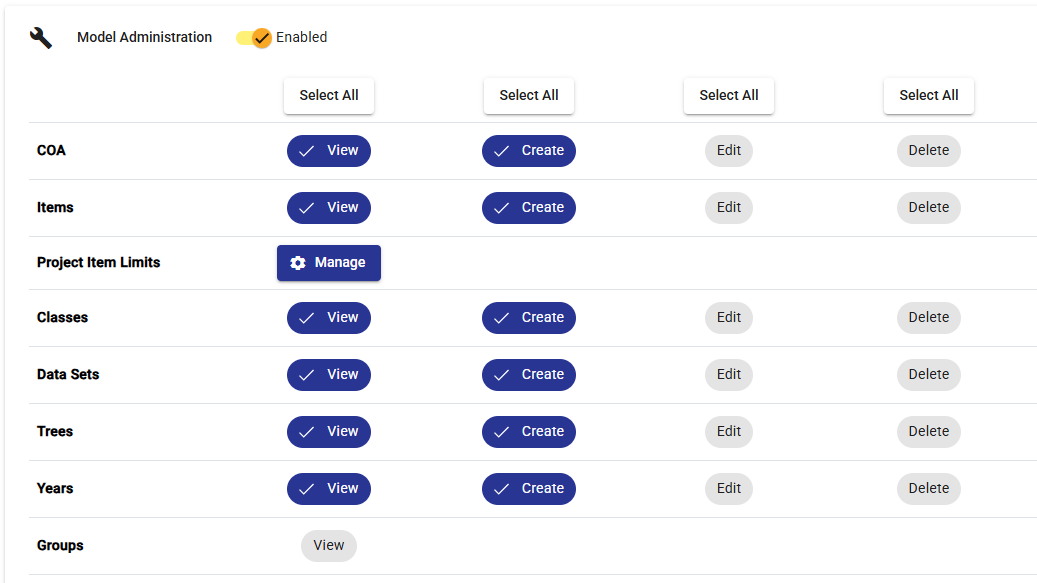
Model Administration Permissions
The module is accessible to Users who have the Admin credential selected in their User profile or who have been assigned access to the Model Administration module through Role permissions.
Note access provide through an assigned Role profile might limit access to only certain aspects of the model – for example a user might be able to view a particular Tree component, but not make any changes to it.