


Working with Salary Plan Key Segment Mapping

Aug 19, 2026
The Administrator can control the Key Segments and related mapping to be used throughout the Salary Plan Module.
All Key Segments used in Salary Plan must have been set up in Model Administration (typically during Operating Plan implementation) to be available for use in Salary Plan.
Map Salary Plan Segments
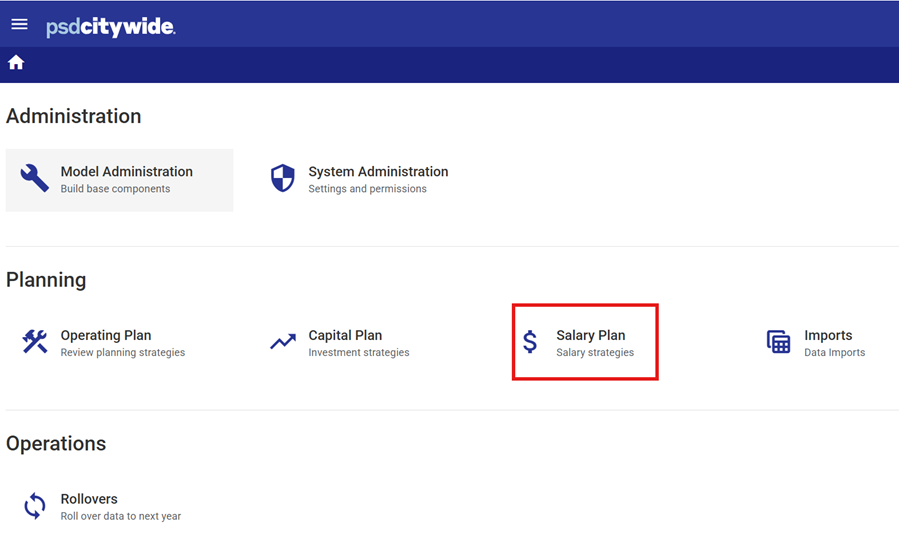
- Open the Salary Plan module by selecting the Salary Plan icon from the Planning menu.
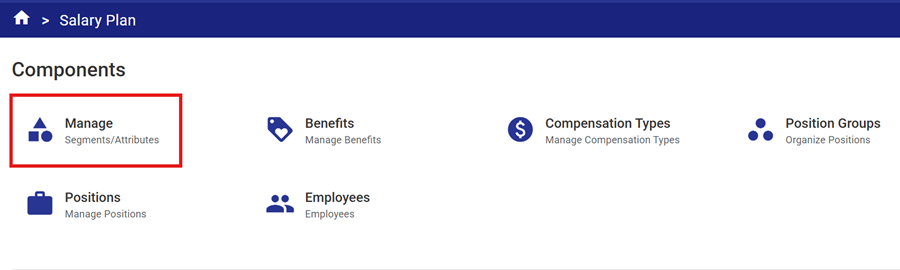
- Open the Manage component of Salary Plan.
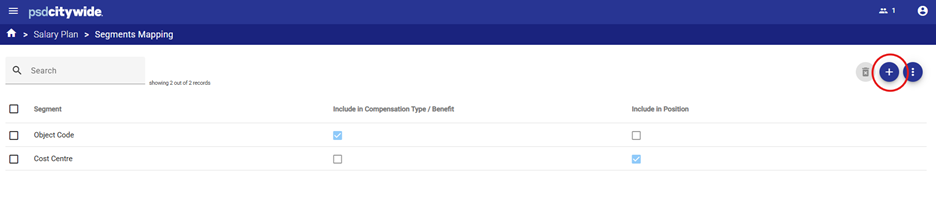
- Add Operating Class Segments to be used in Salary Plan by selecting the
 icon
icon
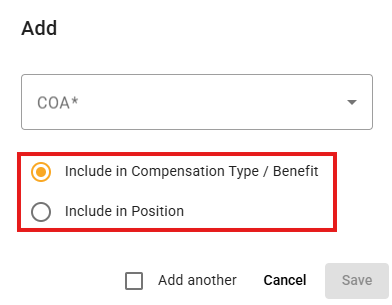
- Select the Segments to be used for coding Compensation and Benefits costs in salary plan.
- To map accounts to be used for coding Benefits and Compensation, click the Include in Compensation Type/Benefit radio button to indicate which segment determines the object account that compensation/benefit costs should be coded to (e.g. if the Key Segment is Object, then object codes like 501000 for Salaries or 501010 for Benefits will be used for compensation and benefit mapping.)
- To map the account segments to be used for allocating Positions and Employees, click the Include in Position radio button to indicate which segment(s) - funds, departments, costs centres, activities etc. - Positions and Employees should be allocated to. (Only one Key Segment: Cost Centre
 is mapped in the simplified example above – typically there will be several Key Segments here > Fund, Activity, Cost Centre etc. required to map where costs related to positions and employees should be coded.)
Mapped segments must follow the order configured for the Operating COA Class Key (your organization's general ledger account string configuration).
Related Articles: Model Administration - Chart of Accounts (COA)


